


|
Navigation
Recherche
|
Master Pollo AI Video Generator: How to Create Videos from Image and Text
lundi 1 décembre 2025, 14:20 , par Macworld Reviews
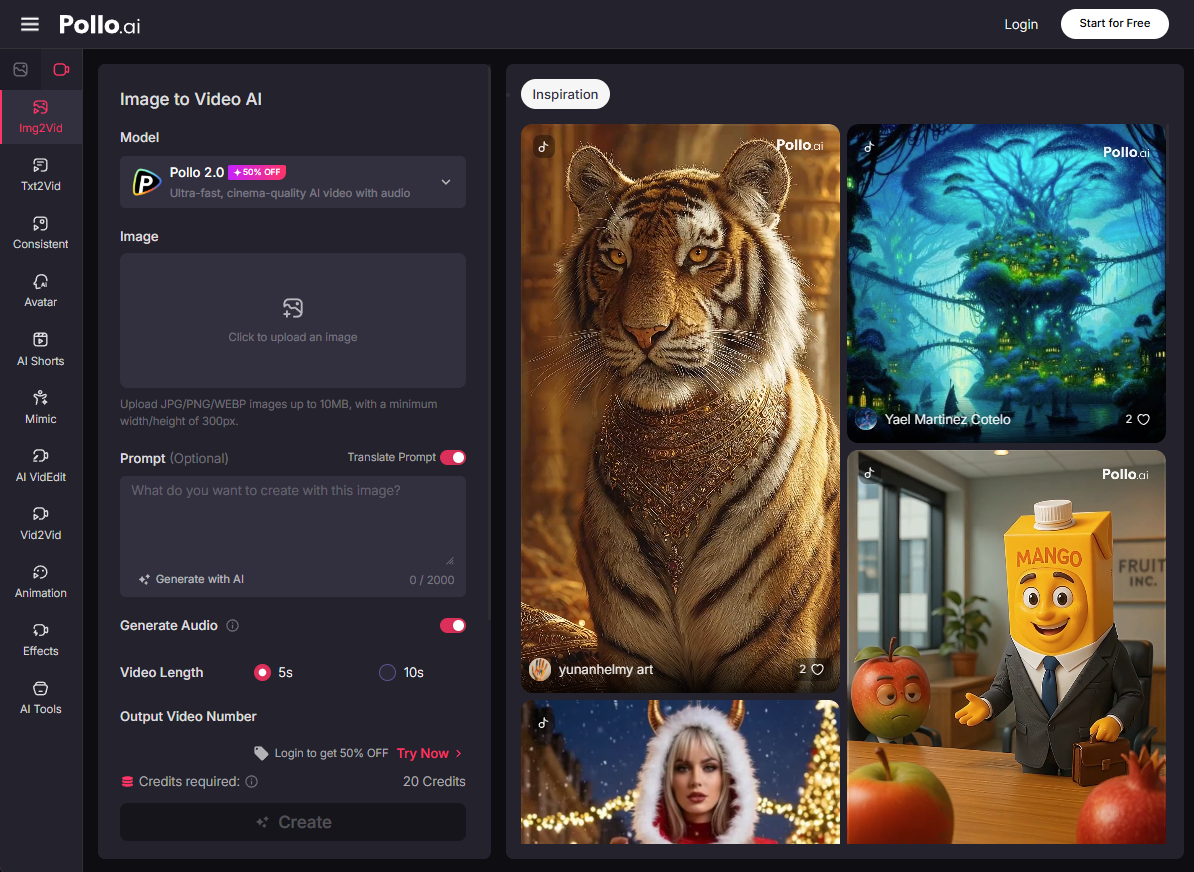
Video creation has never been easier. Whether you’re a content creator scrambling to keep up with TikTok trends or a marketer in need of quick product demos, AI video generators are becoming your new best friend. The global AI video market is booming—hitting $716.8 million this year and projected to grow at 20% annually, according to Fortune Business Insights. Pollo AI is leading the charge with its powerful video generator that turns text prompts or static images into dynamic videos using top models like Google Veo 3.1, Sora 2, and its own Pollo 2.0. If you want to skip the learning curve and start creating videos today, here’s exactly how to do it. What is Pollo AI’s video generator? Pollo AI video generator is a creative hub that makes video production feel effortless. The video generator comes in two flavors: Text to video AI, where you describe a scene and it builds a full clip from words alone. Image to video AI, which animates your existing photos or artwork into motion. Powered by cutting-edge models, it handles everything from short social clips to longer story-driven videos. No need for cameras, actors, or hours in editing suites—just your imagination and a few clicks. It’s especially handy if you’re into quick content for TikTok, YouTube, or marketing. Step-by-step guide: using Pollo AI video generator Start by accessing the Pollo AI Video Generator section on the dashboard, or navigate directly to the Image to Video AI interface or the Text to Video AI interface. How to use image to video AI Got a photo or graphic? This mode breathes life into it, turning stills into animated sequences. Great for enhancing existing assets. Pollo AI Upload Your Image and Pick a Model: Drag in your photo or artwork (supports JPG, PNG, etc.). Choose a model like Sora 2 for a realistic result, or Pollo 2.0 for fast and cinematic video creations. Add Prompt Instructions (optional): Describe how the image should move. For example, if it’s a landscape photo, prompt: “Animate the waves crashing gently on the shore, add a flying bird.” Keep it focused on actions, transitions, and effects. Set Preferences: Adjust video duration, aspect ratio, and select audio generation option as needed. Generate and Export: Click “Create” and give it 15-45 seconds. Watch the preview, then download or edit further if needed. How to use text to video AI This is ideal if you have a story or idea but no visuals ready. It turns descriptive text into complete videos. Pollo AI Pick Your Model: Pollo AI provides brief descriptions of various models to help you quickly find the right one. If you’re unsure, try a few to discover your favorite. Enter Your Prompt: Type a detailed description of the video. Include elements like style (e.g., animated or live-action) and mood. Be specific for better results. Pollo AI suggests prompts if you’re stuck, pulling from trending ideas like product demos or travel vlogs. Customize Settings: Tweak aspect ratio (e.g., 9:16 for vertical shorts) and video length. Use negative prompts to avoid issues, like “no shaky camera” or “no distorted faces.” Create and Review: Hit “Create,” and wait 20-60 seconds (depending on length). Preview the video right in the browser. If it’s spot on, download it (free tier has a watermark) or share to socials. Not quite right? Regenerate with tweaks. Why choose Pollo AI for video generation? In a sea of AI tools, Pollo AI stands out for being practical and versatile. Here’s why it’s worth your time: All-in-one creative suite Pollo AI goes beyond videos—it’s your go-to for everything creative. Sure, the video generator rocks with text-to-video AI and image-to-video AI for seamless clip creation, but pair it with the AI image generator for custom visuals. Need more? Dive into AI avatar tools for personalized spokespeople, an AI short video generator for quick social bites, or even an AI video editor to polish outputs with cuts, effects, and text overlays. No app-switching; just one platform for your workflow. Rich effects library to unleash your creativity Pollo AI offers a rich library of special effects that’s a playground for creative exploration. The library caters to diverse needs—from playful effects that add personality to people and animals, to professionally crafted tools designed for product marketing. Showcase your products with purpose using targeted effects like AI Xmas Girl Product Ad or AI Chasing Products to create eye-catching demos. These marketing-focused tools help you achieve promotional goals without the need for a professional studio or expensive equipment. Top-notch models and quality Pollo AI gives you access to an impressive lineup of industry-leading tools all in one place. For video, you’ll find leading models like Runway AI, Hailuo AI, Kling AI, and Google Veo. For top-tier image generation, Pollo AI offers Nano Banana, Midjourney, Flux AI, and GPT-4o, allowing you to create stunning visuals before animating them. Access this wealth of resources to experiment with powerful tools and effortlessly deliver exceptional results within a seamless creative environment. Conclusion Using Pollo AI’s video generator is a simple process. Just select a mode, create your prompt, customize the settings, and generate. For striking results, try using models like Google Veo 3.1, Sora 2, or Kling AI. Don’t hesitate to generate a few times—later attempts often work best. With the technology evolving quickly, it’s a great time to try it out. Visit Pollo AI to start creating your own videos. See where your creativity takes you.
https://www.macworld.com/article/2990219/master-pollo-ai-video-generator-how-to-create-videos-from-i...
Voir aussi
|

59 sources (15 en français)
Date Actuelle
dim. 21 déc. - 22:11 CET
|
 Lire la suite sur Macworld Reviews


