


|
Navigation
Recherche
|
iOS 26.2’s small tweaks add up to a big update for your iPhone–here’s what’s new
mercredi 10 décembre 2025, 12:30 , par Macworld Reviews
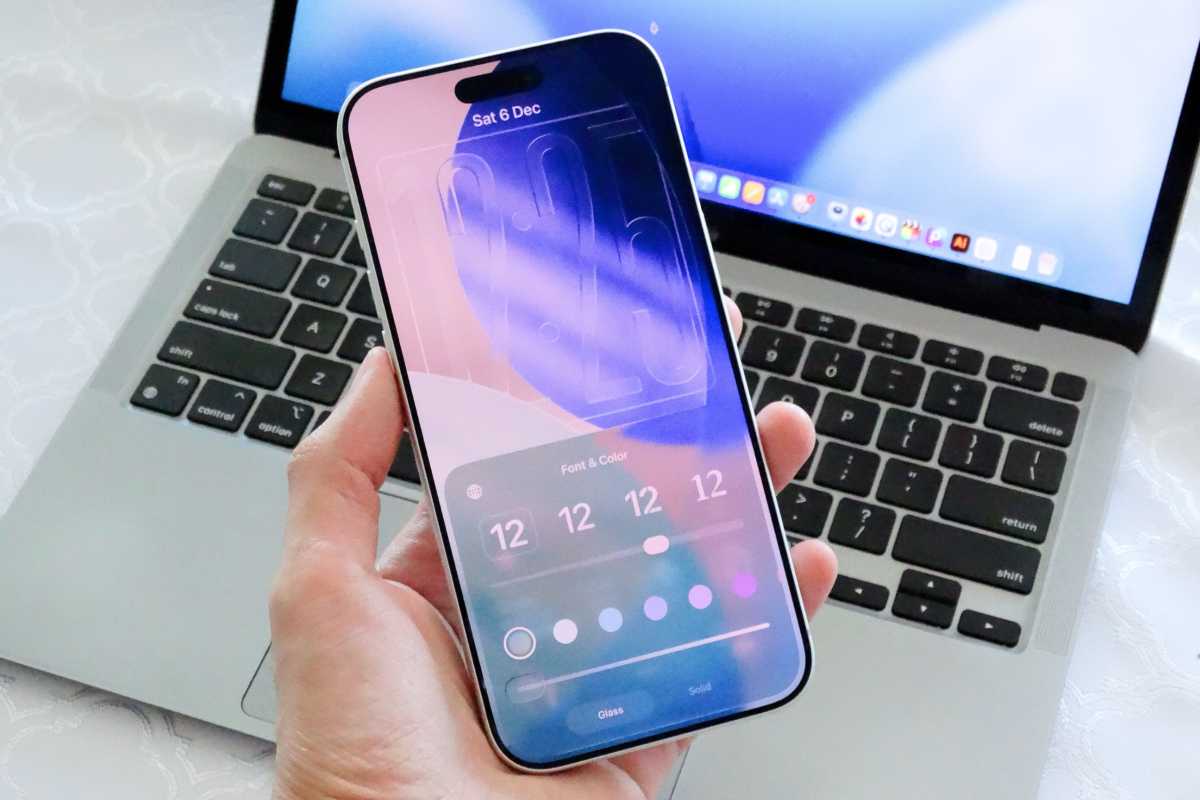
iOS 26.2 will soon be available to download on your iPhone, and while the update isn’t a major overhaul, it brings numerous changes and refinements, including more Liquid Glass tweaks. More importantly, iOS 26.2 brings a series of minor new features throughout the system that will surprise and delight iPhone users. Here are all the new iOS 26.2 features you’ll want to check out right away: Liquid Glass Lock Screen slider After listening to user feedback, Apple added a new option to iOS 26.1 that lets users choose between the traditional Liquid Glass look and a “Tinted” mode that makes everything more frosted. Now with iOS 26.2, there’s also a similar adjustment for the clock on the Lock Screen. Thanks to a new slider in the Lock Screen options, users can adjust the transparency of the clock to make it more or less “Liquid.” The option to make the clock completely solid remains, and users can still choose between different colors. iOS 26.2 lets you adjust the Liquid Glass intensity on the Lock Screen.Foundry Liquid Glass Measure app Apple continues expanding its new design language across the system, and the Measure app is the latest to get the Liquid Glass treatment. With iOS 26.2, the app’s controls, buttons, and panels adopt the same translucent, fluid look introduced earlier this year. The interface feels more consistent with the rest of iOS. Functionality remains the same, but the updated visuals help modernize an app that hadn’t seen a significant UI refresh in a while. The Measure app got a Liquid Glass update in iOS 26.2.Foundry Auto chapters in Podcasts Although Apple Podcasts already had a chapter selector, it required the podcast creator to set them manually. iOS 26.2 automatically creates chapters based on the content transcript, so you can easily jump to a specific part of an episode. In addition, the app now detects mentions of another podcast available on the platform and then provides the user with a link to listen to that episode. Improved Sleep Score Another new feature introduced with iOS 26 is Sleep Score, which ranks the user’s sleep quality based on data obtained from the Apple Watch. This includes things like how long you sleep, bedtime, and interruptions. With iOS 26.2, Apple is making fine adjustments to Sleep Score, which now provides a more accurate score for each category. These are the new scores for each level: Very High: 96-100 High: 81-95 OK: 61-80 Low: 41-60 Very Low: 0-40 The Sleep Score is improved in iOS 26.2.Foundry Set reminders as alarms With iOS 26.2, users can choose to display reminder notifications as alarms. Instead of a banner, the reminder will take up the entire screen with an audible alert, just like traditional alarms set in the Clock app. You can snooze the reminder or slide to stop it. It’s worth noting that the feature is optional, which means you can continue using the Reminders app with classic notifications if you prefer. AirDrop PIN AirDrop is also gaining a new feature with iOS 26.2. When you’re using AirDrop with someone who isn’t in your contacts list, AirDrop will show a PIN code to be entered on the other device, similar to Apple TV pairing. Doing this adds the other device to a list of known devices for 30 days. So the next time, you can quickly use AirDrop with that person without changing any settings or entering the PIN again. You can now secure AirDrop interactions with a pin code in iOS 26.2.Foundry Apple News shortcuts With the update, Apple News users will find new shortcuts with quick access to specific sections of the News app. These include Sports, Puzzles, Politics, and Food. The shortcuts are shown on the Apple News app home screen, as well as in the Search tab. Freeform app tables Apple’s Freeform whiteboarding app, which lets users sketch, brainstorm, organize notes, and more on an infinite canvas, is getting a powerful tool in iOS 26.2: tables. After updating to iOS 26.2, you’ll see the new option to add tables alongside the existing options for creating notes and adding shapes. Tables can be customized with multiple rows and columns. AirPods Live Translation in the EU One of the biggest new features in iOS 26 is Live Translation for AirPods. As the name suggests, this feature allows users to talk to people who speak a different language, with the earbuds translating the conversation in real time. The feature was previously only available in a few regions, but iOS 26.2 expands it to more countries. The feature is now enabled for all users in the European Union. It’s worth noting that AirPods Live Translation only works with AirPods Pro 3, AirPods Pro 2, and AirPods 4. The feature is available in English, French, German, Portuguese, Spanish, Italian, Chinese, Japanese, and Korean. Update to iOS 26.2 Functionality remains the same, but the updated visuals help modernize an app that hadn’t seen a significant UI refresh in a while. If you’re already running iOS 26, this update makes the experience feel more cohesive, more responsive, and simply nicer to use day-to-day. To get the update when it arrives, head over to the Settings app, then General and Software Update.
https://www.macworld.com/article/3004106/ios-26-2-small-tweaks-add-up-to-a-big-update-for-your-iphon...
Voir aussi
|

59 sources (15 en français)
Date Actuelle
mer. 31 déc. - 16:21 CET
|
 Lire la suite sur Macworld Reviews


