


|
Navigation
Recherche
|
Chromium explained: How the open-source engine drives today’s browsers
vendredi 2 janvier 2026, 12:00 , par ComputerWorld
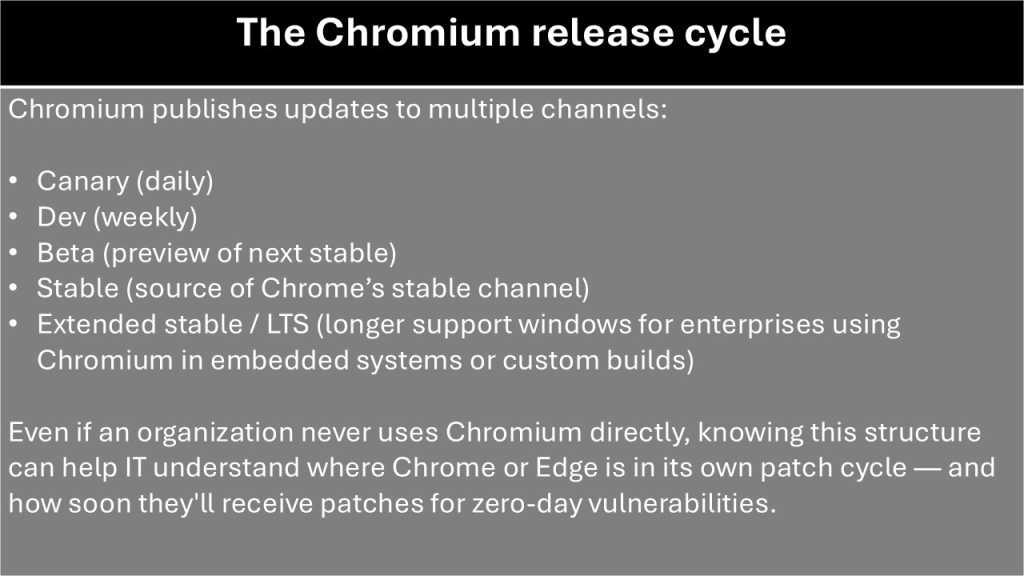
> Chromium provides the core engine, network stack, and architecture for Google Chrome, Microsoft Edge, and other major web browsers. The project’s code lineage traces back to 2001, forking from Apple’s WebKit. Unlike Chrome, the pure Chromium build lacks proprietary Google features like automatic updates, licensed media codecs, and cloud sync. What is Chromium? Chromium is the open-source browser project that underpins many of today’s mainstream web browsers, including Google Chrome and Microsoft Edge. Launched along with Chrome in 2008 as a “vanilla” version of the browser without Google’s proprietary additions, Chromium includes the core rendering engine, network stack, JavaScript runtime, and browser architecture. Chromium is open source and community maintained, albeit with heavy involvement from Google. Even if most end users never download Chromium by name, it provides the performance, security, and standards compliance for the browsers that they have come to rely on. The history of Chromium Chromium’s lineage begins in the 1990s with KDE, an open-source project that at the time focused on building a UI and applications for Linux. KDE developed KHTML as the rendering engine — that is, the component that parses markup language and other components and uses them to build a web page — for its Konqueror browser. Apple forked KHTML in 2001 to create WebKit, the rendering engine for Safari, the in-house browser it was in the process of developing. When Google launched Chrome and Chromium in 2008, WebKit served as the initial rendering engine for both. Over time, Chrome’s requirements for multiprocessing and performance optimizations diverged substantially from WebKit. To support those needs, Google officially forked WebKit in turn in 2013 to create a new engine, called Blink. JavaScript processing has been handled since the launch of Chrome by the V8 engine. Google officially forked WebKit in 2013 to create a new engine, called Blink. This wasn’t just a branding change; it was a move to support multi-process architecture — the capability for one crashed tab to stay isolated without taking down the whole browser. Today, that same isolation is what allows 2026 AI agents to browse the web safely in the background without interrupting the user’s primary session. This year also saw the full rollout of Graphite — Chromium’s new hardware-accelerated rendering back end. It’s designed to replace the aging “Ganesh” system to handle 2026 web graphics (WebGPU) much faster. Chromium vs. Chrome: What’s the real difference? Chromium is both the name for the open-source project and for the browser released by that project. The Chromium browser includes rendering and JavaScript engines and a user interface for interacting with those components. Chrome is the commercial product Google builds on top of that foundation (except on iPhones and iPads, where, in compliance with Apple policy, Chrome uses the same WebKit rendering engine as Safari). Understanding where Chromium ends and the Chrome begins is key to understanding how most modern browsers function. When you compile Chromium straight from the source tree, you get a fully functional browser with a familiar UI, though it will seem noticeably stripped down compared to Chrome. Still, it’s fast, transparent, and its code is open for anyone to inspect or modify. Chrome adds Google’s proprietary layers, and these include the features that most users now associate with the Chrome experience: Licensed media codecs such as H.264 and AAC The Widevine DRM module required by Netflix, Disney+, and other streaming services Integrated Google account sync for bookmarks, passwords, and history Automatic update mechanisms for Windows, macOS, and Linux Google Safe Browsing, which provides real-time protection against suspicious websites Built-in Google services such as translation and spell-checking Those additions make Chrome more polished and convenient for everyday users and enterprise deployments, but they also mean Chrome includes a richer layer of telemetry and cloud-connected features than the bare Chromium build. Some of the biggest differences between Chrome and Chromium lie in the realm of privacy and data tracking. Because Chrome integrates deeply with Google’s ecosystem, it sends more diagnostic and security-related information back to Google services. Chromium lacks most of that plumbing; it ships without Google Sync, doesn’t use the same heuristics for Safe Browsing, and generally operates without cloud-tied personalization. Some third-party projects, such as Ungoogled Chromium, extend this even further, but the core distinction already gives developers and privacy-sensitive users more control with Chromium. From a practical standpoint, this all means that Chromium and Chrome serve different audiences. Chromium is well suited for developers who want to test against a clean rendering engine, IT teams who need to validate internal web apps without vendor-specific behavior, and power users who prefer a transparent, no-extras browser. Chrome is the right choice for most ordinary users because it delivers predictable updates, strong media support, a mature extension ecosystem, and an easier management model through enterprise policies. Which browsers use Chromium? The 2026 lineup Because Chromium is open source and freely licensed, it serves as the code base for a wide array of popular web browsers; Chrome is just one of them. That means many of the browsers in wide use today — across both consumer and enterprise environments — share the same rendering engine, JavaScript engine, sandboxing architecture, and extension compatibility. But they layer on unique features, UI tweaks, privacy or enterprise tooling, and update and packaging policies. The Chromium ecosystem is expanding into a new category of AI-native browsers. Because Chromium is open source, companies like OpenAI and Perplexity are building AI agents on top of the stable, secure, and compatible foundation for rendering the web. Google Chrome: The flagship, fully supported browser from Google. Microsoft Edge: Microsoft’s modern browser, rebuilt on Chromium. Brave: A privacy-oriented browser that builds on Chromium but emphasizes blocking trackers and ad networks by default. Vivaldi: A highly customizable browser targeting power users, with advanced tab management, UI personalization, and productivity features. Opera: A long-running browser that’s recently been rebuilt on Chromium; often chosen for its built-in features like sidebar apps, VPN, and lightweight profile on some systems. Epic Privacy Browser: A more obscure option that uses the Chromium codebase but emphasizes privacy by stripping out tracking and forcing private browsing Dia (by Atlassian): Following Atlassian’s $610 million acquisition of The Browser Company late this year, Dia has become the conapny’s flagship enterprise browser. It uses Chromium to ensure compatibility with SaaS tools but adds a layer designed to syncs with Jira and Confluence to provide deeper context. Arc (by Atlassian): While Atlassian has pivoted toward the enterprise-focused Dia, Arc remains aimed at Chromium customization. Perplexity Comet: Launched in July 2025, Comet is is designed to be an AI-first “exploration engine.” It uses the Chromium core to render pages but features an assistant sidebar that can browse multiple tabs simultaneously to synthesize research and answer queries with direct citations. OpenAI ChatGPT Atlas: Released in October 2025, Atlas is OpenAI’s entry into the browser market. It features a native agent mode designed to allow the AI to autonomously navigate the web. Chromium and Microsoft Edge: How the switch reshaped the enterprise browser If you had shown that list to someone just a few years ago, the biggest surprise they’d encounter would be that Microsoft now uses Chromium as the basis for its own flagship browser. Since the early days of Internet Explorer, Microsoft had maintained its own browser engine (Trident, later renamed EdgeHTML). But in the face of rapidly declining market share, the company threw in the towel and chose to switch to Chromium in late 2018. This shift has helped unify the web experience for businesses. For enterprises running large SaaS portfolios or custom web apps, the gaps between Chrome and Microsoft’s browsers (first Internet Explorer, then Edge) translated into inconsistent behavior and increased testing overhead. Redmond’s move to Chromium eliminated those discrepancies almost overnight. With Edge now using the same Blink rendering engine and V8 JavaScript engine as Chrome, web developers can assume a much higher degree of consistency across browsers. For internal application teams, that means fewer bugs tied to engine-specific quirks, simpler QA workflows, and less need for separate compatibility matrices. At the same time, Edge has retained and expanded Microsoft’s enterprise-specific capabilities. Chromium provides the underlying platform, but Microsoft has layered in differentiators designed for Windows and Microsoft 365 environments: IE Mode, which allows legacy Internet Explorer–dependent apps to run on the Trident engine inside Edge, giving organizations a bridge for older internal tools. Defender SmartScreen, Microsoft’s phishing and malware protection system, which operates alongside Chromium’s own security model. Group Policy and Intune management, offering granular control for browser configuration, update channels, extension permissions, and security baselines. Enterprise sync, integrating work profiles with Microsoft accounts and conditional access policies. Workspaces and productivity integrations, tying the browser closer to Microsoft 365 workflows. Chromium’s rendering compatibility combined with Microsoft’s enterprise tooling has helped make Edge the default browser in managed Windows environments at organizations that might have otherwise migrated their entire stack away from Microsoft. The upshot is a two-vendor ecosystem running on one engine. Chrome and Edge compete on manageability, UI, privacy stance, and cloud integration, but the underlying platform remains consistent. How to install (and uninstall) Chromium safely >Chromium isn’t distributed like Chrome or Edge. There’s no big “Download” button on the homepage, and there’s no built-in auto-updater. If you want to experiment with Chromium you need to be deliberate about where you get it and how you manage it. Before you start, pick a trusted source. For most users, the safest options are either Chromium project’s download page or a well-known third party that wraps the official binaries and tracks versions, such as Woolyss. Avoid random “Chromium” download sites that bundle adware or malware. >To install Chromium on Windows (basic snapshot build): > From your chosen download page, choose the Windows build that matches your system (typically 64-bit). Download the ZIP or EXE package. If you downloaded a ZIP: Extract it to a folder under your user profile (for example, C:Users\AppsChromium). Launch chrome.exe from that folder. Optionally, create a shortcut from chrome.exe to your desktop or Start menu. >To uninstall a user-level Chromium build on Windows: > Close all Chromium windows. Delete the folder where you extracted Chromium (for example, C:Users\AppsChromium). Delete the user data directory if you created one separately (for example, C:Users\AppDataLocalChromiumUser Data). Remove any shortcuts you pinned to Start or the taskbar. >To install Chromium on macOS: > From your chosen source, download the.dmg or.zip for macOS. Open the downloaded file and drag the Chromium app to your Applications folder (or another folder if you prefer to keep it separate). Launch Chromium from Applications or Spotlight. The first time you open it, macOS Gatekeeper may prompt you to confirm that you want to run an app from an identified developer or internet download. >To uninstall Chromium on macOS: > Quit Chromium. Drag the Chromium app from Applications to the Trash. Optionally, remove its profile data, typically under ~/Library/Application Support/Chromium. Empty the Trash. >To install Chromium on Linux: >On Linux, you have two broad choices: distro-packaged Chromium or upstream-style builds. > Use your distribution’s package manager (recommended when available): Ubuntu/Debian: sudo apt install chromium-browser or sudo snap install chromium (depending on release). Fedora: sudo dnf install chromium. OpenSUSE: sudo zypper install chromium. These packages are maintained by your distro and update through the normal system update mechanism. Use upstream binaries from a site like Woolyss if your distribution doesn’t provide Chromium or is significantly behind: Download the Linux build. Extract and run the chrome or chromium binary from the extracted directory. >To uninstall Chromium on Linux: > If installed via package manager: > Debian/Ubuntu: sudo apt remove chromium-browser or sudo snap remove chromium Fedora: sudo dnf remove chromium OpenSUSE: sudo zypper remove chromium If you used a tarball or manual install, delete the folder you extracted and optionally remove your profile directory (often under ~/.config/chromium). Why users choose Chromium For most organizations, Chrome or Edge is the practical default: you get automatic updates, enterprise policy controls, full codec support, and tight integration with corporate identity systems. But there are some business users who choose Chromium. Chromium behaves like Chrome without Google’s proprietary layer sitting on top of it, and that difference creates several advantages for skilled users: A cleaner testing surface: Chromium exposes the rendering engine and JavaScript engine without Chrome’s cloud-connected features. For anyone who builds, tests, debugs, or validates internal web apps or SaaS integrations, this “pure” environment can simplify troubleshooting. If something works in Chromium, it’s highly likely to work in Chrome, Edge, or any other Blink-based browser. Transparent behavior with fewer background services: Chrome’s added conveniences — account sync, Safe Browsing real-time checks, translation services, form prediction, and other heuristics — are useful but can also complicate diagnostics. Chromium removes those layers, making it easier to isolate rendering or performance issues without second-guessing which service injected which behavior. Less telemetry and fewer cloud tie-ins: Some business users, especially in regulated industries or working with sensitive client data, prefer to avoid browsers that automatically connect to external services. Chromium users can eschew Google Sync, proprietary update services, personalized suggestions, and most automatic background calls. For users who need a low-noise environment while handling confidential material, Chromium offers a more predictable footprint. More control over update timing: Chrome’s auto-updater is designed for safety — but it also means updates arrive when Google decides. Chromium, by contrast, updates only when the user or administrator chooses to fetch a new build. In scenarios where stability is crucial during a long testing cycle or demo, this manual model can be a feature rather than an inconvenience. How Chromium updates work — and why the enterprise should care Chromium’s rapid update cycle is one of its defining characteristics. The open-source project moves fast: new features land daily, security patches can be published within hours of a vulnerability’s discovery, and major version branches advance on a predictable six-week cadence. But “fast” looks very different in Chromium than it does in Chrome or Edge. Chromium has no native auto-updater: the project publishes continuous builds, but does not push them to users or manage their lifecycles. That means a plain Chromium installation won’t automatically receive security fixes or stability patches. Users must download new versions manually, or organizations must build update workflows themselves. This sounds like a reason not to use Chromium in a business setting — and for frontline employees, it usually is. But for IT staff and business power users, the lack of enforced updates can be a feature, not a drawback: A stable window during testing and validation: Chrome and Edge update aggressively, often multiple times per month. While that’s ideal for security, it can disrupt ongoing testing cycles or introduce subtle behavior changes in internal web apps. Chromium’s manual update model lets teams pin a browser version and keep it stable while diagnosing compatibility issues or preparing a major rollout. Insight into the exact patch level underlying enterprise browsers: Because Chrome and Edge both take Chromium’s code base, understanding when and how Chromium updates land helps teams anticipate upcoming behavior changes in the managed browsers employees actually use. Watching Chromium gives IT a “preview channel” before those changes become mandatory in Chrome Stable or Edge Stable. A clean baseline for troubleshooting update-related problems: When a Chrome or Edge update triggers unexpected behavior — suddenly broken CSS layouts, authentication hiccups, extension failures — Chromium provides a neutral reference point. Users can install a nearby Chromium build to see whether the issue stems from the underlying engine or from the vendor’s added layers. Support for controlled rollouts: Enterprise teams that manage browsers through Group Policy, Intune, Jamf, or third-party provisioning tools often run staggered release channels. Chromium allows administrators to test patches in a micro-environment before promoting them into Chrome or Edge deployment waves. The five phases of Chromium’s release cycle. Foundry Chromium: The invisible powerhouse Chromium sits at the center of the modern web: an open-source engine that powers Chrome, Edge, and most of the browsers business users rely on every day. Understanding how it works — and how it differs from the commercial products built on top of it — gives you clearer insight into browser behavior and compatibility issues. Most users will never run Chromium directly, but for power users, developers, and IT teams, it remains a valuable tool: a neutral baseline for troubleshooting, a controlled environment for testing, and a window into the engine that defines the web experience across nearly every device. In a browser landscape increasingly unified around a single foundation, Chromium is both the root system and the reference point — the place where the modern browser begins.
https://www.computerworld.com/article/1717405/googles-chromium-browser-explained.html
Voir aussi
|

56 sources (32 en français)
Date Actuelle
ven. 2 janv. - 16:15 CET
|
 Lire la suite sur ComputerWorld


